Manage Orders
KB14280
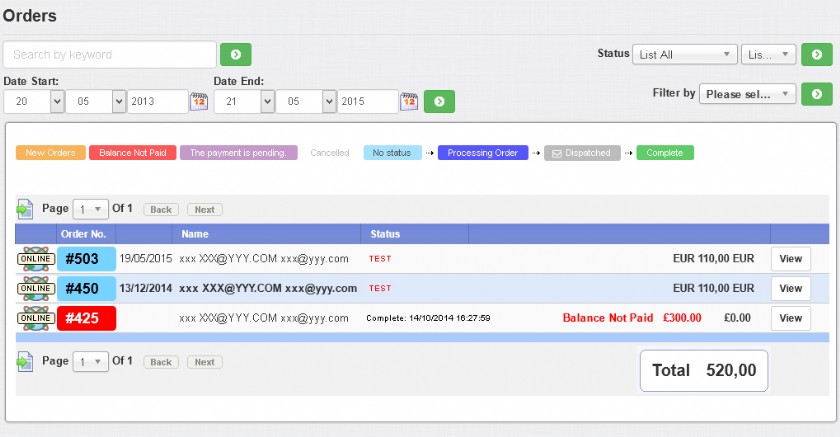
The main page for listing and managing your orders.
Easy searching and viewing of orders is extremely important to ensure speedy order fullfillment and customer service. The eShop is heavily reliant on color coding so we can see at a glance the status of the order.
On the side bar visible on all pages a count of any new orders highlighted in red that have not been viewed are displayed.
There are plenty of options designed to make order management as simple and efficient as possible. Pages are laid out neatly with a detail for highlighting important order information.
Order status changes are made simple, dispatch emails are automatically sent, an automatic log of all order status changes are made. Notes can be viewed internally or by the customer. Totals can be changed for refunds and an in depth view of the communication with the payment gateway is provided ensuring you are always in control.
On the side bar visible on all pages a count of any new orders highlighted in red that have not been viewed are displayed.
There are plenty of options designed to make order management as simple and efficient as possible. Pages are laid out neatly with a detail for highlighting important order information.
Order status changes are made simple, dispatch emails are automatically sent, an automatic log of all order status changes are made. Notes can be viewed internally or by the customer. Totals can be changed for refunds and an in depth view of the communication with the payment gateway is provided ensuring you are always in control.
| This is where you can view all new orders. By default these new orders are those that have been paid but not yet completed. Orders that haven't yet been viewed will be highlighted in bold. A count of new orders is also displayed on the left navigation. By default the list contains paid orders only but any order can be searched even if not paid. When you have set an order to complete it will be removed from this list but is always searchable by changing the status to complete. Orders can be filtered and searched by keyword for easy access to any order. Search by keyword Enter search term in text box in navigation area and click to search. This will search for an order paid or not paid. Date Start / End Filter orders by a date range Online / Offline
Status Filter by order Status. Click on the tab to filter orders.
[LIVE] - Show live orders only [TEST] - Show test orders only Filter by [Gateway Errors] - Select to show all orders with payment gateway errors. Click to show results. Order No The order number. Date Date order paid. Maybe blank if order is not paid. Status Order status displayed. Amount Amount and currency of order. If text appears in Red then there is a balance needing payment. View Click or anywhere on the row of data to view the order. |
|||||||||||||||||||||


Updated on: 03/05/2020 17:16:57
How Helpful was this article
1 Votes Cast
