Menu Bar
KB14326
The menu bar facilitates easy navigation of your website
| The menu bar facilitates easy navigation of your website. The menu bar is visible on all pages and is usually located at the top of the page. The menu links can span the entire width of the screen space or be constrained to centered content area.The menu bar can be customised with colors, opacity and font. For more help on customising the navigation bar click here. The menu bar only contains links setup in web pages which could consist of a page with content or a web link page which would link to an alternative internal or external page of your site. Menu links can optionally contain icons which may highlight one link from another. The menu bar is fully compatible with all screen sizes and will adapt to fit the available screen width. Web pages can be set to appear to the left or right of the menu bar. For full compatibility with all devices and based on Bootstrap v3 only 1 level of sub menus are allowed. Access to the sub menu will require the web user to click on the menu item. An example of how the menu bar on the website is related to the web pages view in the administration area. 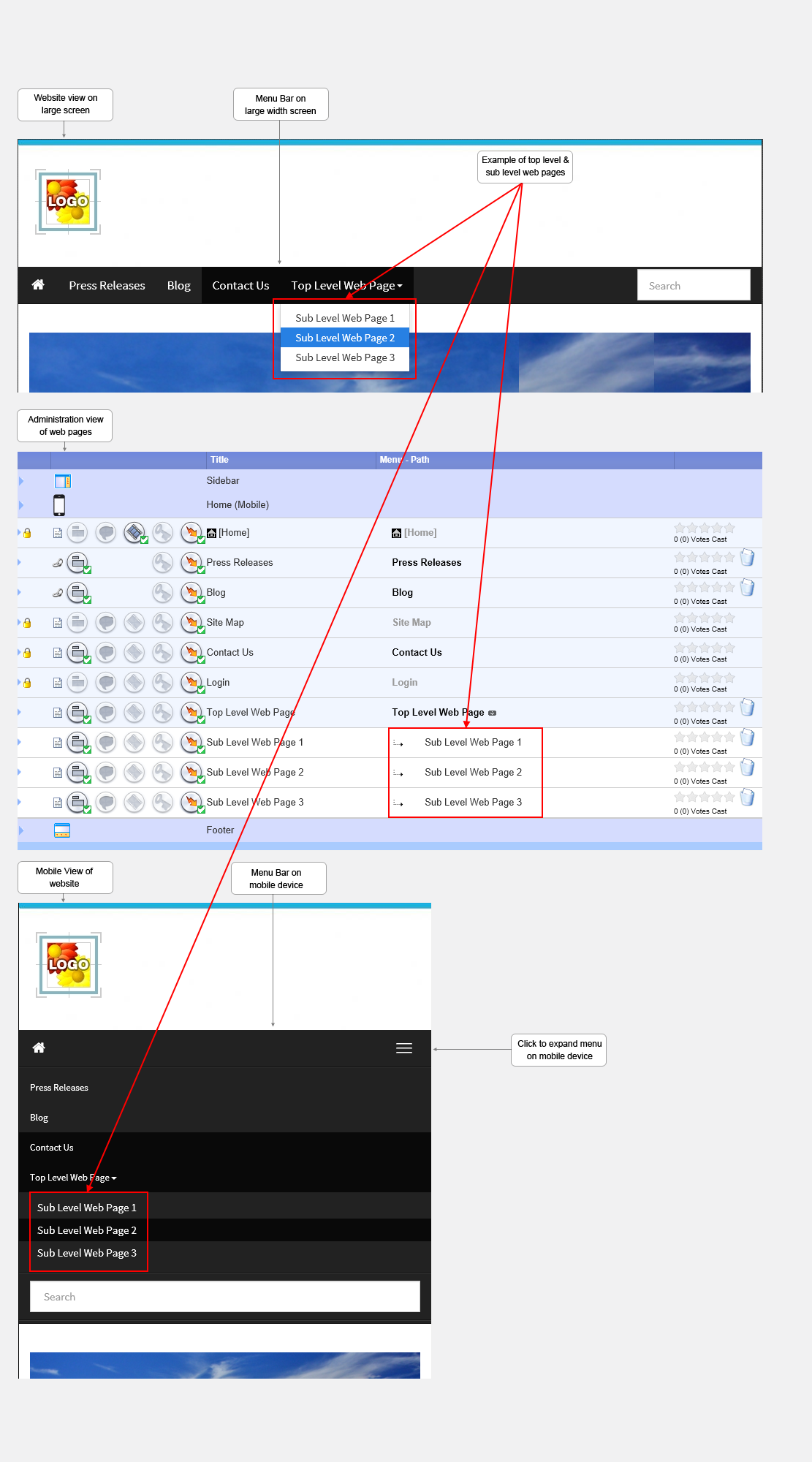 Help with menu bar paths Pages are linked together in a heirarchy much like folders on your computer.  Page A will always be displayed in the menu bar as it is a top level. These title will be in bold as in the example above.  Page B Page B To view this page the web user will click on Page A and Page B will automatically appear. |
Updated on: 03/05/2020 16:52:35
How Helpful was this article
1 Votes Cast
