Reset Password
KB14472
The only way to retrieve a forgotten password is to reset the password.
The only way to retrieve a forgotten password is to reset the password. For security passwords are stored encrypted and cannot be un-encryptyed. Follow these steps to reset your password and choose a new password.
Step 1
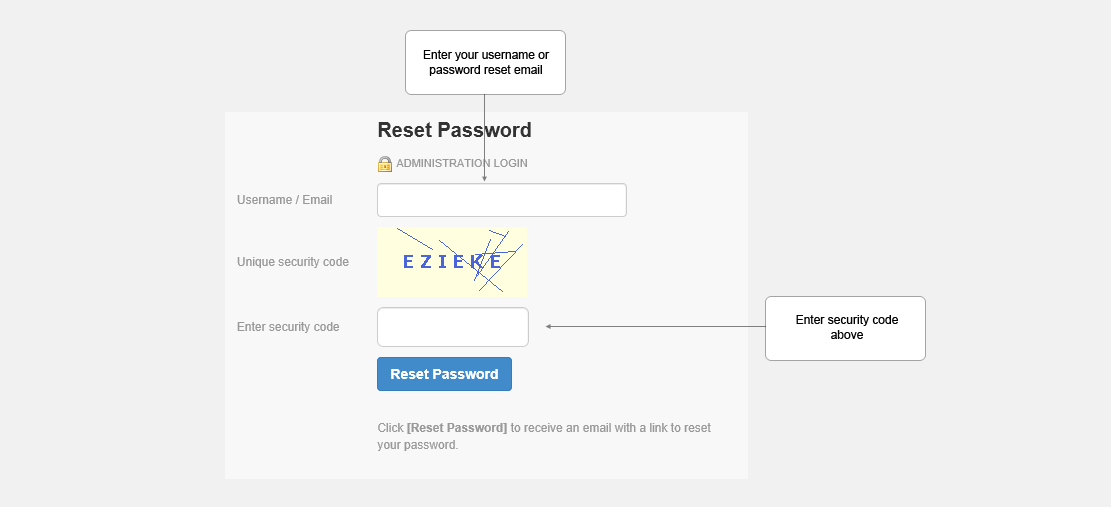
Click "Reset Password" on login screen. Enter your username or password reset Email. In order to reset your password you will need a password reset email address as a password reset link will be sent to this email address. The email address given when you signed up for your site or profile will be used as the default although this can be changed if you wish to edit your admin user account.
Step 2
You will receive an automated email. Click the reset password link and enter your new password.
Updated on: 13/09/2015 11:55:34
How Helpful was this article
1 Votes Cast
