Managing Comments on Mobile
KB14480
View all comments on the system and activate, view or delete as required.
Manage your comments and authorise on a mobile device. Administrations cannot edit comments and can only publish or remove comment.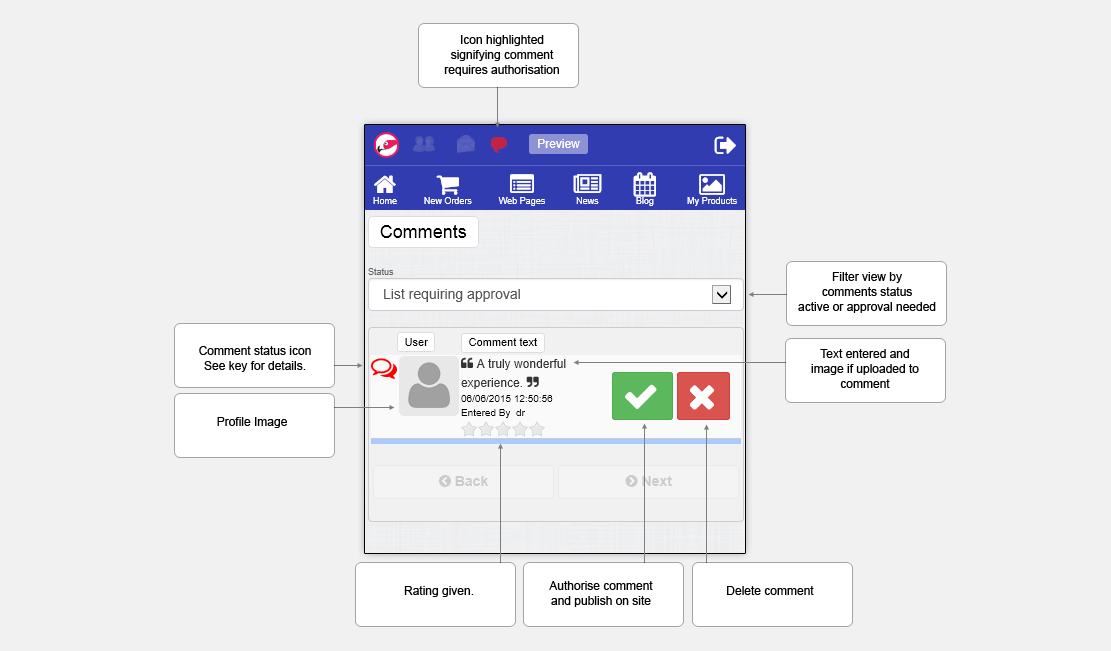
Key to symbols used
Super User
Key to buttons
Status You can show: [Show All Comments] - Display all comments whatever the status. [Active] - Display Only active comments live and viewable on website. [List requiring approval] - Display Comments requiring approval [List in progress] - Display Comments in progress and not yet submitted for approval. Click to show results. Sort By You can sort the results by [Name] - sorts alphabetically by name [Date Created] - the latest added comment listing will be displayed first. Comment text Displays a small block of text from the comment for your reference plus entered by and entered date.. Rating Comment rating. A blank rating  signifies no rating was left. signifies no rating was left. |
|||||||||||||||

 pages on website. On community networked sites a super user can easily leave multiple comments on the activity page. Click icon to switch status
Updated on: 03/05/2020 16:18:47
How Helpful was this article
1 Votes Cast
