Selecting An Account to Edit
KB14877
There are 2 configurations that can be applied when your hub is setup by the webmaster.
There are 2 configurations that can be applied when your hub is setup by the webmaster.
The Hub Webmaster and Hub Administrator Depending on which configuration will dictate how much of a satellite site can be edited.
To Edit a Site with Webmaster Permissions
 on the main hub home page. You will now be logged in exactly the same way as the user and have full access to every area of the site
To Edit a Site with Administrator Permissions
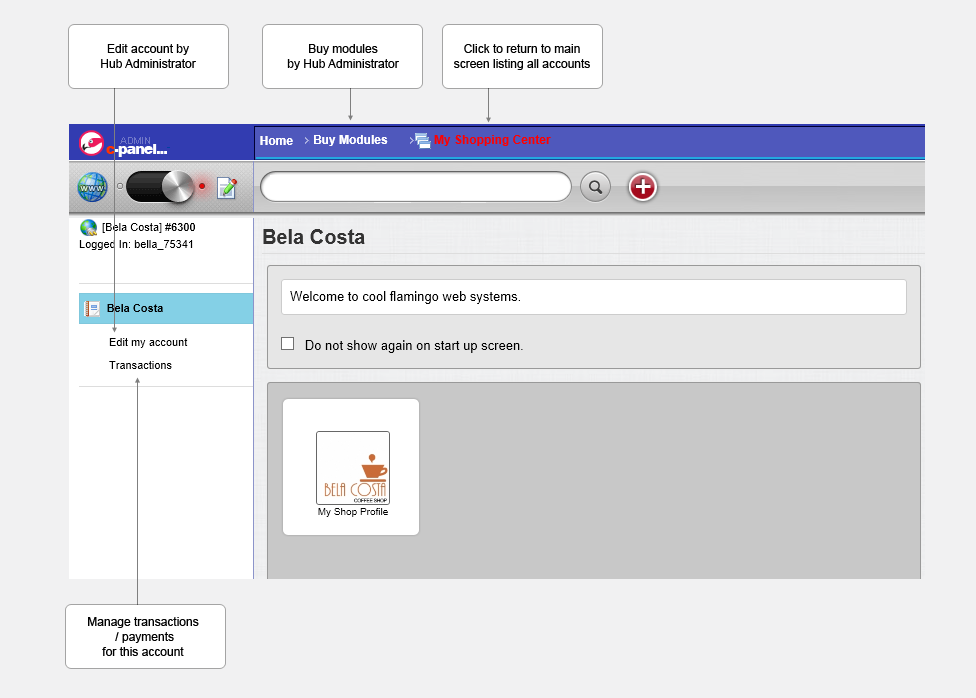
on the main hub home page. You will only have very limited access with links for purchasing / adding editing transactions or updating the accounts contact details.
To revert back to the main hub home page.
On all pages in the top navigation bar there is a link in red that will always revert you back to the main hub home page.
The diagram below shows the cut down view of the Hub Administrator.
Updated on: 13/09/2015 11:42:19
How Helpful was this article
1 Votes Cast
