Manage Fidelity Points Scheme
KB14560
To incentivise sales run an oniine fidelity points scheme.
The online fidelity points scheme works exactly as you would find in any store. We have a card and each time we purchase an item we get a stamp on our card.
When we reach 10 stamps we receive a promotion usually a free item.
How do we setup ouor fidelity points scheme?
First we need to setup and activate the fidelity scheme system in eShop Settings then for each product we wish to qualify for fidelity points we set fidelity a point accordingly. Some products could offer more fidelity points than others its up to you how you run your online promotion. Once we reach 10 points the customer will automatically be given a unique one-off discount code generated for them by logging into their online store account. This discount code can then be applied to receive the fidelity reward.
eShop Settings
Active
Click checkbox to activate fidelity points scheme.
Full Details
Enter the full details of the scheme which will be visible to the customer.
Enter the full details of the scheme which will be visible to the customer.
Discount Type
Set how we wish to apply the discount
[Fixed Amount] - Apply a fixed amount discount to the total order
[Percent] - Apply a percentage discount on the total order.
Amount
Amount of discount
Points required
Enter the number of points required to activate the discount code
Background Card
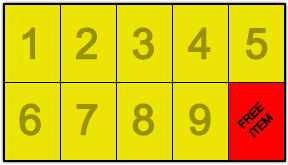
Use the preset card or upload your own card. The dimensions must be 288px width X 165px height. View the example below or download the Photoshop files at the end of this page.
Fidelity Points Stamp
Use the preset stamp or upload your own. The dimensions must be 55px width X 77px height. View the example
below or download the Photoshop files at the end of this page.


Customer View
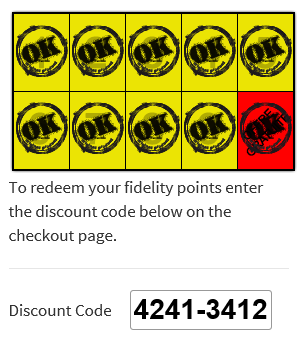
The customer can view their fidelity points balance at any time by logging into their account. Once the fidelity points have reached the required amount a discount code is automatically generated.
Customer View
The customer can view their fidelity points balance at any time by logging into their account. Once the fidelity points have reached the required amount a discount code is automatically generated.
Download Photoshop Graphics Kit
To manage your own graphics and quickly get started.
Download fidelity_card_photoshop_assets.zip
Updated on: 03/05/2020 17:15:13
How Helpful was this article
1 Votes Cast
