Introduction to Layers
KB14431
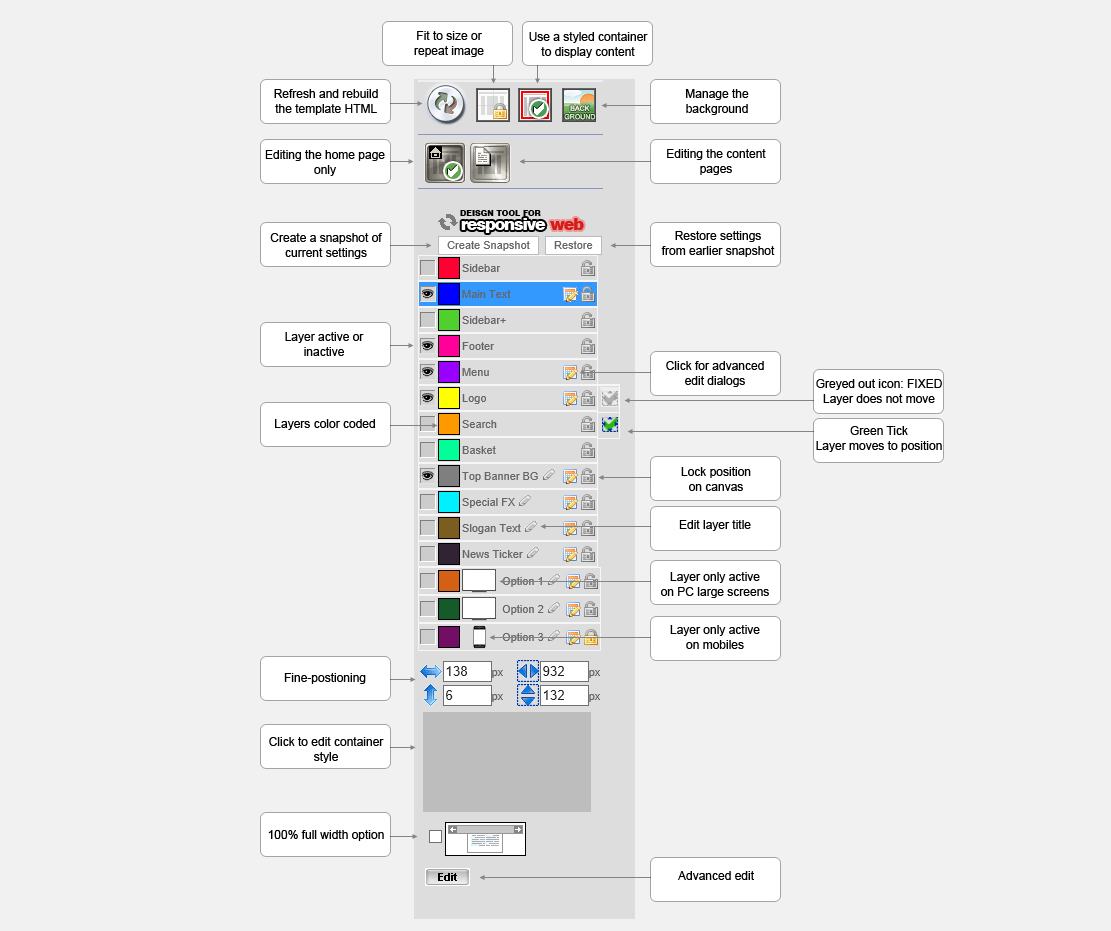
The interface is similar to image editing software - we select a layer and can open up further editing commands or advanced positioning
Layers can easily be resized or dragged into position. To resize select SHIFT + drag.
Think of layers as sprites that perform a specific task usually extracting the data you have entered in the administration area.
There are many different types of layer some that can be styled and layers that generate slide shows.
To build a fully responsive site all positioning in the canvas area is calculated by where the layer is set on the canvas - fully centered, align to absolute left or right of container, or align to absolute left or right of container but with an offset.
New: Positioning layers relative to screen and absolute positioning.
Think of layers as sprites that perform a specific task usually extracting the data you have entered in the administration area.
There are many different types of layer some that can be styled and layers that generate slide shows.
To build a fully responsive site all positioning in the canvas area is calculated by where the layer is set on the canvas - fully centered, align to absolute left or right of container, or align to absolute left or right of container but with an offset.
New: Positioning layers relative to screen and absolute positioning.
 Layer will adapt to screen and scroll
 Layer is vertically fixed on page and will not scroll.
Updated on: 07/10/2015 12:57:45
How Helpful was this article
1 Votes Cast
